
 Table of Content
We're all talking to our devices more. We ask for the nearest open pharmacy, the best tacos “near me,” or where to buy compost on a Sunday. Those requests no longer go through a search box alone. AI systems and voice assistants interpret the question, compare available information, and offer an answer within seconds.
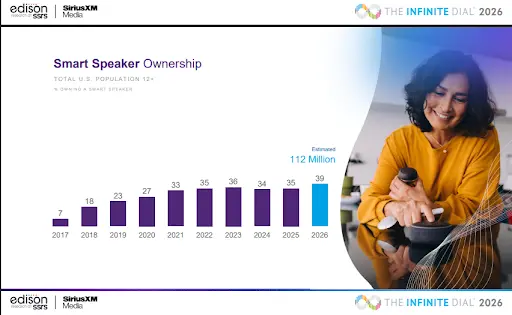
The shift is already visible in everyday behavior. The Infinite Dial 2026 found that 39% of Americans aged 12 and older own a smart speaker, representing an estimated 112 million people. Businesses with incomplete listings may simply be absent when that audience asks for a recommendation.
Search is changing too. Google now surfaces AI-generated answers with AI Overviews, while Microsoft's Copilot provides assistance across Bing and Windows.
It is tempting to think, “We're on Google, so we're covered.” Yet assistants do not all depend on Google.
This article explains how AI and voice systems find business information, which listings matter, how to strengthen your website, and what to measure after making updates.
Understanding AI Assistants And Their Search Mechanisms
Start with a practical question: where does each assistant get its facts?
Apple's Siri leans on Apple Maps. Apple launched Apple Business so owners can control company information across its devices. An Apple Maps profile is now a core listing.
Google Assistant uses your Google Business Profile and Google's wider index. Continue improving that profile if you have already invested in it, but do not stop there.
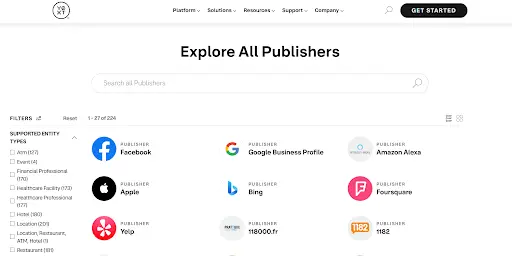
Amazon Alexa blends several sources. Amazon does not publish one official provider list, although Yext's Amazon Alexa connection shows how third-party feeds can supply local results.
Microsoft Copilot and Bing draw from Bing Places and the wider web. An unclaimed Bing profile leaves a gap across that ecosystem.
The picture gets broader from there. Photos, categories, and reviews may come from Yelp, TripAdvisor, or regional directories. Navigation systems, watches, and fitness devices also draw from mapping providers.
Business information behaves like connected digital assets, not one directory entry. Errors can travel, while accurate records support several touchpoints.
The Importance Of Diverse Listings
When assistants compare sources, matching details build confidence. Your name, address, hours, category, and phone number should tell one story.
Gregor Emmian, Deputy Chief Digital Growth Officer of Rise, diversified Rise’s listings to expand visibility and reduce reliance on one platform.
He says, "Diversifying your listings is like planting seeds in more than one field. Every platform you appear on becomes another doorway for customers to find you, and it protects you from being at the mercy of a single algorithm's mood swings."
Small teams can uncover demand by claiming profiles and correcting details. Their service has not changed. Their local SEO has, because more systems can confirm it.
The need varies by industry. A Clearwater bathroom remodeling company may benefit from service-area details and project photos because homeowners often compare nearby providers before calling.
7 Steps to Optimize Your Business For Voice And AI Search
Improvement starts with concrete actions. These are seven steps that help assistants find, understand, and recommend your business:
1) Identify the key AI platforms and directories for your business.
Begin with the listing platforms that feed major search and voice tools: Google Business Profile, Apple Business Connect, Bing Places, and Amazon Alexa's ecosystem.
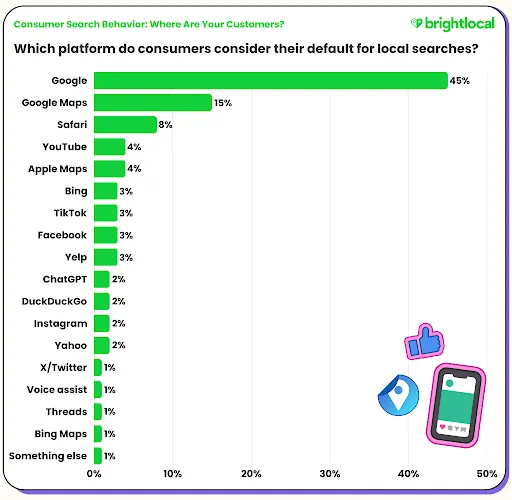
BrightLocal’s 2025 consumer research found that one in five consumers begin local searches directly within map platforms. Google Maps, Apple Maps, and Bing Maps account for 20% of preferred local search channels.
You can also add category-specific and regional directories your customers actually use, like Yelp or TripAdvisor.
Then consider AI platforms where customers may ask for recommendations, such as ChatGPT, Google Gemini, Microsoft Copilot, and Perplexity.
Do your customers look through a chatbot, phone, laptop, car, or smart speaker? Mapping that journey connects voice search and local SEO to real behavior.
2) Optimize your website with schema markup
Structured data gives machines labeled business information. The schema identifies hours, location, services, and contact details without guesswork.
Use Schema.org's LocalBusiness types and follow Google's structured data guidelines for local businesses. Include your business name, address, phone number, hours, coordinates, services, and profile links.
Schema supports useful pages. A GEO, AEO, and LLMO optimization strategy still needs accurate services, direct answers, clear expertise, and language matching customer questions.
3) Lock down NAP consistency everywhere.
Your name, address, and phone number, or NAP, must match across platforms. Consistency identifies the current record.
One wrong number can lose a call. After a move, rebrand, or expansion, find stale records instead of assuming directories will update them.
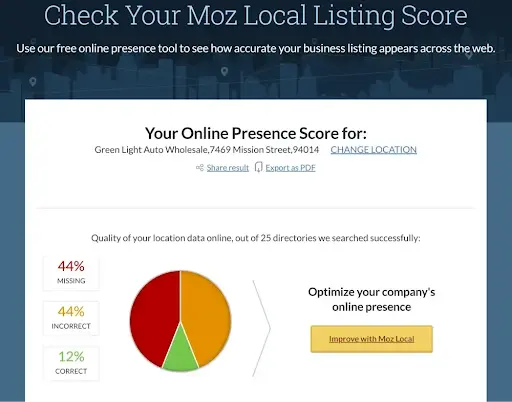
Moz's local ranking research highlights citation consistency. Its local citation checker identifies accurate, missing, or incorrect business details and explains factors that may influence local search visibility.
4) Lean into local SEO basics that voice relies on.
Choose clear categories. Explain what you do and where. Add current photos, invite feedback, and respond thoughtfully.
Answer questions customers say aloud. “Do you offer same-day repairs?” and “Is there parking?” are useful. Keep pages fast, mobile-friendly, and scannable.
Relevance also matters. A health clinic publishing about trt online should explain availability, eligibility, consultation steps, and geographic limits clearly rather than repeating the phrase without context.
5) Claim Apple Maps and Bing Places, and keep them complete.
Create or verify listings through Apple Business and Bing Places. Add categories, photos, holiday hours, and action pages.
Bing can import a Google Business Profile. Review everything afterward because syncing can also copy old details.
6) Create content that answers voice-style queries.
List the 10 to 20 questions your team hears on calls or during consultations. Answer each in roughly 40 to 60 words on an FAQ or service page.
State the answer first, then add a condition or next step. Use schema where appropriate, but write for people.
A legal or ops team searching for contract management software usually asks a narrower question first - "does it track renewal deadlines" or "can it flag liability caps automatically" - so pages that answer that specific sub-question in the first sentence, before the pitch, are what AI Overviews tend to pull from.
7) Audit and update on a regular cadence
Inspect core listings and schema quarterly. Update seasonal hours, services, links, and photos. Correct conflicts quickly.
Jason Ledbetter, an operator and growth strategist, discovered a syncing tool for managing business listings across multiple platforms and it took a huge load of repetitive work off his team.
He puts it simply: "Managing dozens of listings by hand is where mistakes creep in. A good syncing tool lets you update once and push changes everywhere, so you spend less time fixing errors and more time actually running your business."
A tool reduces work, but someone must own the information. Assign one person to approve changes and check public profiles.
Tools and Resources To Manage Business Listings
Manual management works for one location and few profiles. Larger networks are harder to control. These tools can help:
- Yext offers large network coverage, direct integrations with platforms like Amazon Alexa, Apple, and Bing, robust field control, and review monitoring.
- BrightLocal supports citation building, audits, rank tracking, profile management, and reputation tools.
- Moz Local automates distribution to major directories, supports data cleansing, and centralizes updates.
- Uberall provides listings, store pages, and review tools for multilocation organizations.
- Whitespark focuses on citation research and building, including niche directory opportunities.
- Semrush Listings Management distributes business data across a partner-powered directory network as an add-on.
If you choose a syncing platform, follow this six-step process:
- Centralize your source of truth. Record approved contact details, hours, categories, services, links, and photos.
- Connect and verify. Link supported profiles and complete ownership checks for every location.
- Fill every field. Add holiday hours, attributes, and action links.
- Publish and sync. Push changes, then allow several days for some directories to display them.
- Monitor and respond. Watch for overwrites, duplicates, and feedback. Resolve conflicts quickly.
- Schedule quarterly updates. Add seasonal information, services, and fresh photos so profiles remain current.
Measuring Success and Visibility in AI and Voice Searches
Voice and AI discovery does not always produce a click, so website sessions tell only part of the story.
Look at listing behavior. Directions, map views, calls, messages, and nonbranded searches can indicate assistant discovery.
Track these signals:
- Direction requests and map views: Review activity reported by Google Business Profile and Apple Business.
- Calls and messages: Compare changes over time while keeping your primary NAP consistent.
- Discovery searches: Watch how often Google shows the profile for nonbranded queries.
- Photo views and completeness: Check whether current, complete profiles gain more engagement.
- Tagged listing links: Add UTM parameters where platforms allow them, then separate Apple Maps and Bing traffic in analytics.
Lankitha Wimalarathna, Founder & CEO of Hiveage, warns against reading these numbers in isolation.
She explains, "A spike in calls means nothing if you can't tie it to a specific listing or content change. Businesses that track consistently, month over month, are the ones who actually learn what's working - everyone else is just guessing after the fact."
Compare similar periods and note listing changes. Feed repeated patterns back into your categories, answers, hours, and photos.
What Comes Next
Showing up in voice and AI search is not about chasing one algorithm. It is about making the business easy to understand wherever customers ask for it. That requires consistent records, structured websites, complete Apple, Google, and Bing profiles, and clear answers to real questions.
The search experience continues to move quickly. Google's AI Overviews and Microsoft's Copilot point toward a wider future in which assistants summarize options and act more often for users.
Start with the gaps you can verify today. Claim Apple Maps and Bing Places, correct your NAP, add appropriate schema, and establish a quarterly review. Consider that your next customer may never type your business name into a traditional search box.