 Table of Content
A few years ago I watched a candle brand founder change her product page headline three times in one month. Each time she was convinced the new version was better. Her revenue stayed flat, and she had no idea whether any of the changes helped, hurt, or did nothing at all.
That's the problem with running a small store on gut feeling. You make changes, sales wobble around like they always do, and you tell yourself a story about why. Maybe the new headline worked. Maybe it was payday weekend. You'll never know.
A/B testing fixes this. And the part that surprises most small merchants: you no longer need a developer, an agency, or a five-figure tool to do it.
Why bother testing when you're small?
There's a common belief that A/B testing is only for brands doing millions in revenue. The logic goes: small stores don't have enough traffic, so why bother?
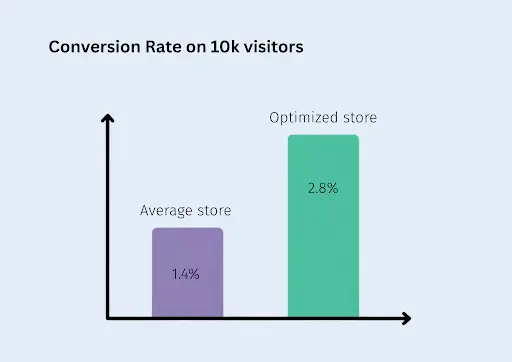
Here's the counterargument. The average Shopify store converts around 1.4% of visitors into buyers, while the top 20% of stores convert above 3.2%, according to Littledata's benchmark data. That gap is enormous. A store getting 10,000 visitors a month at 1.4% makes 140 sales. The same store at 2.8% makes 280 sales from the exact same traffic and the exact same ad spend.
Doubling your ad budget is expensive. Doubling your conversion rate is mostly a matter of finding out what your specific customers respond to. Testing is how you find out.
Small stores actually have one advantage here: changes are cheap to make and there's less internal bureaucracy. No approval chains, no brand committee. You can have a test live by lunch.
What you can test without touching code
Modern testing apps for platforms like Shopify handle the technical side for you. They split your traffic, show different versions to different visitors, and track which version sells more. Most of them work through the app's own interface or your theme editor, so the setup is closer to "using an app" than "doing web development."
Realistic no-code test ideas for a small store:
- Price points. Test $34 against $39 on your bestseller. Pricing tests routinely produce the biggest swings in profit because price affects both conversion and margin at once.
- Product page headlines and descriptions. Benefit-led copy versus feature lists. Short versus long.
- Hero images. Lifestyle photo versus clean product-on-white.
- Free shipping thresholds. Free over $50 versus free over $75.
- Themes and layouts. Some tools let you test one theme version against another, which covers big layout changes without touching a line of code.
Start with pages that already get traffic. For most small stores that means your top one or two product pages, not your About page.
The tools have caught up
This category used to be dominated by Google Optimize (free, but shut down in 2023) and enterprise tools priced for companies with optimization teams. The gap left behind got filled by platform-native apps.
If you're on Shopify, an A/B testing platform built for the platform will handle traffic splitting, price test mechanics, and results analysis inside your existing admin. Similar native options exist for WooCommerce and BigCommerce. The things to check before installing anything:
- Does it slow your site down? Read recent reviews specifically mentioning speed.
- Can it test the thing you care about? Not every tool supports price testing, which is often the highest-impact test type.
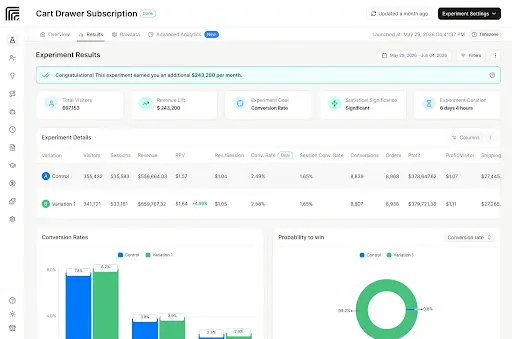
- How does it call a winner? You want a tool that tells you when a result is statistically solid, not one that just shows two numbers and leaves the judgment to you.
Most apps in this space run somewhere between free and $100 a month at small-store traffic levels. Compare that with what you're spending on ads and it's usually a rounding error.
How to run your first test
1. Pick one high-traffic page and one change. One variable at a time. If you change the headline, the photo, and the price together and sales go up, you've learned nothing about which change did it.
2. Write down your prediction before you start. "I think the lifestyle photo will lift add-to-carts because our audience buys the vibe, not the specs." This keeps you honest later.
3. Let the test run long enough. This is where most beginners go wrong. Two days of data means almost nothing. Run tests for at least two full weeks so you capture weekday and weekend behavior, and aim for a meaningful number of orders per variation, not just visitors. Low-traffic stores should test bigger, bolder changes, because small tweaks need huge sample sizes to detect.
4. Don't peek and pull the plug early. Results swing wildly in the first days. A variation that's "winning by 40%" on day two is often dead even by day twelve. Decide your end date up front and stick to it.
5. Keep a log. A simple spreadsheet: what you tested, dates, result, what you'll try next. After six months this log becomes the most valuable document in your business, because it's a record of what your actual customers respond to.
Mistakes that waste your first three months
I'll be blunt about the failure modes, because they're predictable:
- Testing trivia. Button colors on a page with 200 visitors a month. You will never reach a reliable result. Test offers, prices, and headlines instead.
- Calling winners by feel. If the tool says the result isn't conclusive, it isn't. "Version B felt better" is exactly the gut-feeling trap you're trying to escape.
- Copying big-brand results. A test that worked for a giant apparel retailer tells you what worked for their audience. Your customers are not their customers. Global averages already vary
- hugely by category, with food and beverage stores converting several times higher than luxury goods, per industry benchmark data. Treat other people's case studies as test ideas, never as answers.
- Stopping after one losing test. Even mature optimization programs see most tests lose or tie. The wins pay for everything. A losing price test that stops you from making a bad permanent pricing decision has real value too.
Key takeaways
- You don't need a developer. Platform-native testing apps handle the technical work, and many cost less than your monthly coffee budget.
- Test big things first: prices, offers, headlines, and hero images on your highest-traffic pages.
- One change at a time, two weeks minimum, no early peeking.
- Judge results by the tool's statistics, not by feel.
- Keep a test log. Losing tests still teach you something; untracked changes teach you nothing.
The candle founder from the beginning of this article? She eventually ran a proper price test and found her audience happily paid 15% more with no drop in orders. That single result was worth more than a year of headline tinkering. Start with one test this week and find your version of that.