
 Table of Content
Every WordPress website owner eventually learns the same lesson: backups are not optional.
At some point, something unexpected happens. A plugin update breaks the site. A theme conflicts with another extension. Malware slips through zero-day exploits. The hosting provider experiences problems. Or perhaps a simple human mistake removes important content that was never meant to disappear.
When that happens, having a recent backup can turn a stressful situation into a quick recovery. Without one, restoring a website often becomes a slow and frustrating process that can involve lost data, downtime, and unnecessary expense.
That is exactly why backup plugins have become one of the most important tools in the WordPress ecosystem.
For years, most backup solutions followed a similar pattern. They allowed users to create backup files locally and then sync those backups to third-party storage providers such as Google Drive. These integrations work well and remain popular today, but even the biggest providers like Google Drive fail sometimes and many people prefer to stay clear of big companies that have raised privacy concerns throughout history.
Backup Migration introduces a slightly different approach. Instead of relying only on third-party platforms, the plugin includes its own cloud storage service called BackupBliss, complete with a free storage tier. This means users can create backups and store them securely off-site within the same ecosystem, without needing to purchase external cloud storage from the beginning.
It is a practical idea that simplifies the backup process while still allowing users to connect to other storage providers if they prefer multiple fallback options.
Why Off-Site Backups Matter
Many website owners mistakenly believe that backups stored directly on their hosting account are enough. Unfortunately, that is not always the case.
If the hosting server itself experiences a serious failure, becomes compromised, or suffers accidental data loss, local backups may disappear together with the website.
This is why off-site backups are considered best practice.
Keeping backup files stored separately from the hosting environment adds an additional layer of protection and greatly improves disaster recovery options. Whether the files are stored on a dedicated backup storage platform like BackupBliss or a popular cloud storage solution, the important thing is that they exist outside the server hosting the website itself.
Backup Migration makes this process easier by combining backup creation and off-site storage into a single workflow.
Setting Up Backup Migration
Getting started with Backup Migration is straightforward, even for users without technical experience. The plugin can be installed directly from the official WordPress plugin repository. Once activated, it is ready to use immediately with sensible default settings already configured.
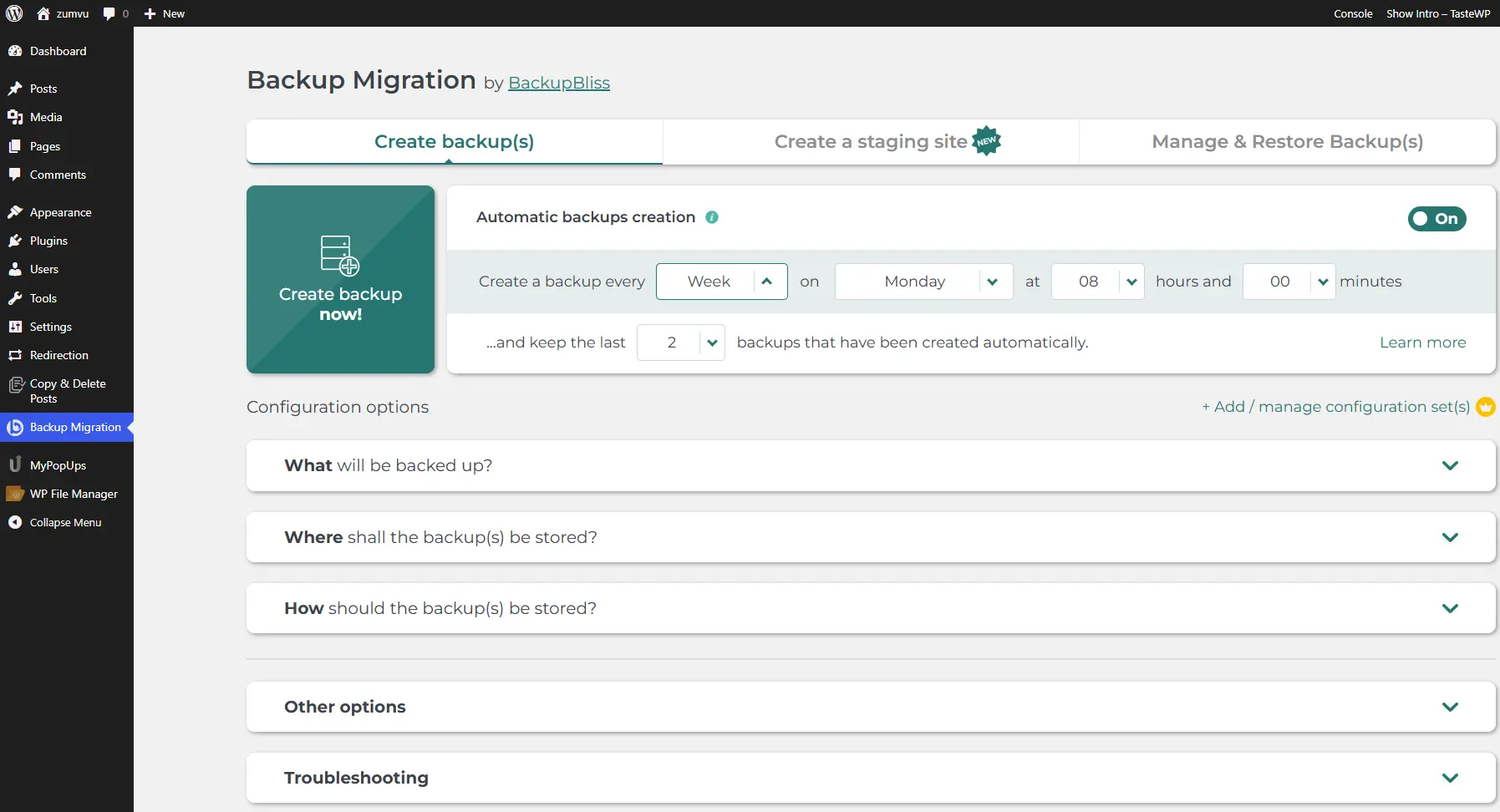
Users who want a complete website backup should navigate to the section called What will be backed up? and ensure that all files, folders, and databases are selected. This creates a full backup containing website files, themes, plugins, uploads, settings, and database content. However, you might want to exclude unwanted files and especially junk in the database - here the premium feature Smart exclusion rules is especially effective and recommended.
Creating the first backup requires only a single click on the Create backup now button.
For most smaller websites, the process takes only a few minutes, depending on server performance and total website size. Once the backup is completed, users can also download a local copy to their computer for additional safety.
The overall user interface is one of the stronger aspects of the plugin. Everything is laid out clearly, making the backup process approachable even for beginners who may feel intimidated by more technical backup tools.
Automatic Scheduled Backups
Manual backups are useful, but automated backups are what truly protect websites long term.
Backup Migration allows users to configure scheduled backups that run automatically in the background. Once enabled, the plugin creates backups at selected intervals without requiring manual interaction.
For many websites, weekly backups are perfectly adequate. More active websites, such as WooCommerce stores, membership sites, or frequently updated blogs, may benefit from daily backups instead.
The scheduling system is flexible enough to adapt to different types of websites and workloads. It uses exact timing pings from BackupBliss servers, and native WP Cron only as a fallback option, as it is known to fail on some website configurations.
Once a schedule is configured, the plugin handles the process quietly in the background. Backup files can then be stored locally or automatically uploaded to connected cloud storage destinations.
This “set it and forget it” approach is one of the biggest reasons why automated backup systems are so valuable.
BackupBliss: Built-In Cloud Storage
One of the more interesting features of Backup Migration is its integration with BackupBliss, the plugin’s own cloud storage platform.
While some backup plugins offer proprietary storage services, BackupBliss stands out by including a free starter tier with 1GB of storage space. This allows users to begin creating off-site backups immediately without needing a paid storage subscription.
Setting it up is relatively simple. Users create a BackupBliss account, generate an API key, and connect it within the plugin under the section Where shall the backup(s) be stored?. Once connected, backups are automatically uploaded to the cloud after creation.
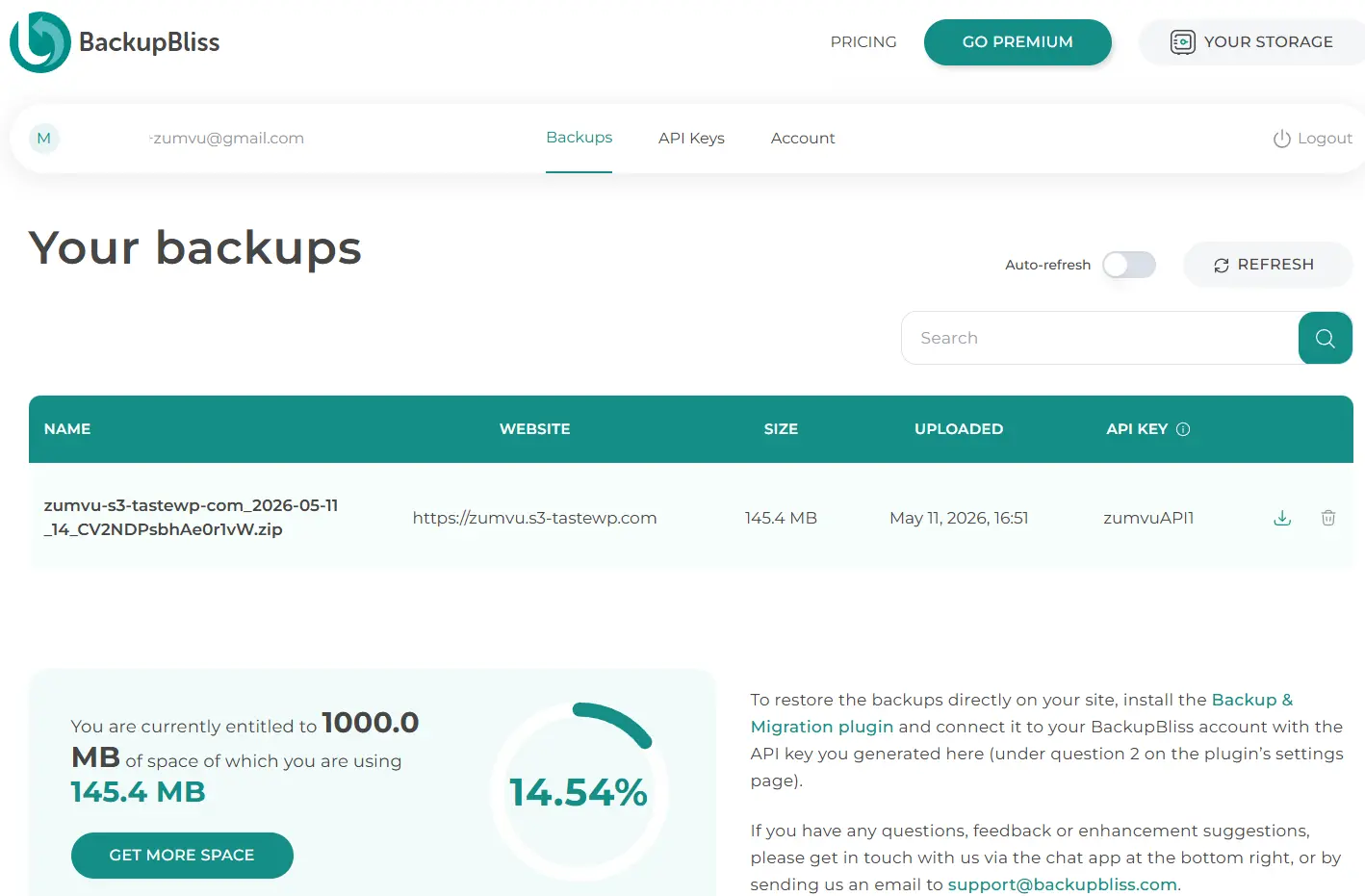
The advantage of a dedicated backup storage platform is not necessarily that it removes setup completely, because some setup is still required. The real benefit is that the storage environment is designed specifically for website backups and integrated directly into the plugin itself.
For many users, especially those managing smaller business websites, this creates a simpler and cleaner workflow than juggling multiple unrelated services.
Additional Storage Providers Still Supported
Although BackupBliss is heavily integrated into the plugin, Backup Migration does not lock users into a closed ecosystem.
The plugin still supports many popular external storage providers, including:
- Google Drive
- Dropbox
- OneDrive
- Amazon S3
- FTP/SFTP
- pCloud
- Wasabi
This flexibility allows users to build backup strategies that fit their own preferences and infrastructure.
Some users may prefer dedicated backup storage. Others may already rely heavily on Google Drive or Amazon S3. Backup Migration accommodates combined approaches.
More Advanced Backup Controls
Another strength of the plugin is its balance between simplicity and customization.
Users who want the easiest possible experience can simply use the default settings and let the plugin handle everything automatically.
More advanced users, however, can fine-tune the backup process in detail. Within the plugin settings, users can create inclusion and exclusion rules for files and folders. This is useful for excluding temporary files, cache directories, logs, or other unnecessary data that may increase backup size without adding meaningful value.
On the other hand, users who prefer complete backups containing absolutely everything can easily configure the plugin to include all website content without exclusions.
This flexibility makes the plugin suitable for both beginners and experienced WordPress administrators.
Website Migration Made Simpler
As the name suggests, Backup Migration is not only a backup plugin. It also functions as a migration tool.
Migrating WordPress websites manually can be surprisingly tedious. Exporting databases, copying files, adjusting configuration settings, and fixing broken URLs often require technical knowledge that many users simply do not have. Backup Migration makes this process fully automated.
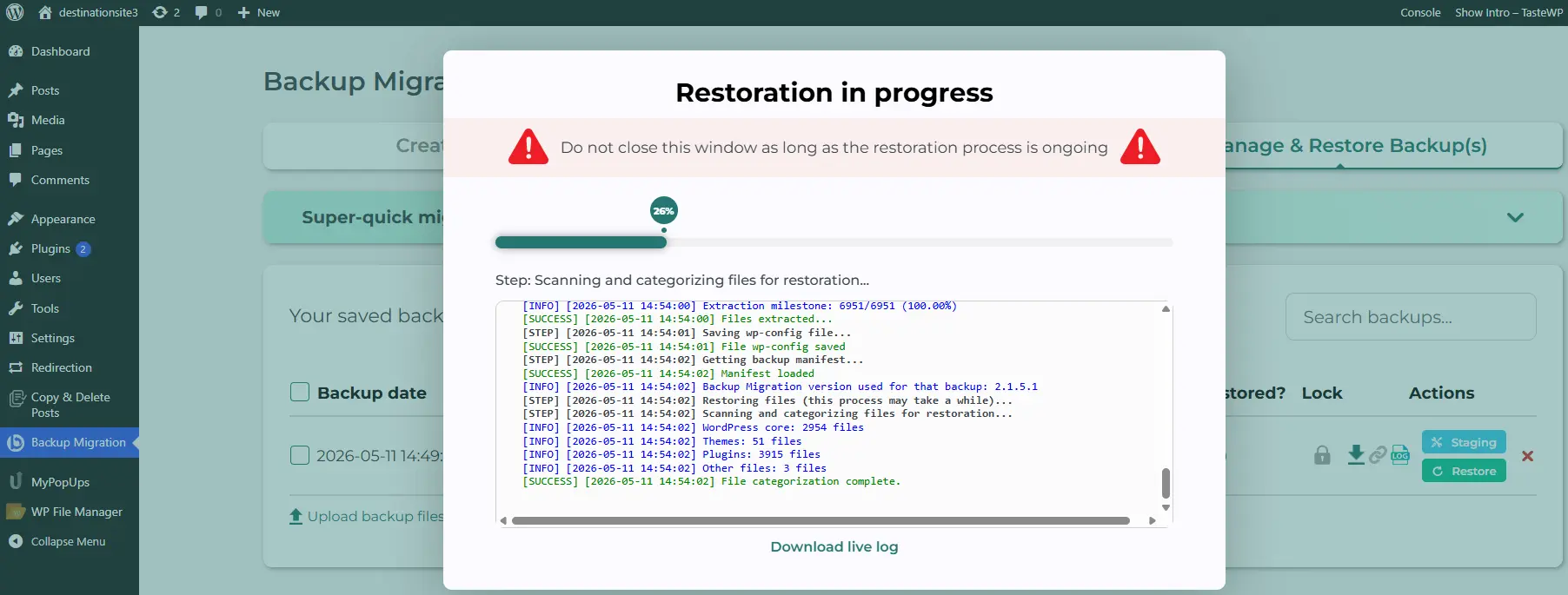
Users can restore backups directly from cloud storage, upload backup files manually, or use direct backup links for quick transfers between websites. With the Backup Migration plugin, the migration process becomes largely automated, reducing the need for manual database edits or search-and-replace operations.
For freelancers, agencies, and business owners who regularly move websites between servers or domains, this can save significant time.
Affordable Premium Features
The free version already includes a substantial feature set, but the premium version expands functionality further, particularly for larger or more demanding websites.
Premium features include support for larger backups, additional automation triggers, enhanced migration options, and other advanced capabilities designed for professional use.
One notable point is pricing: Backup Migration positions itself as one of the most affordable premium backup plugins currently available for WordPress users, especially compared to many well-known alternatives that require significantly more expensive annual subscriptions.
Readers interested in the premium version can also use the discount code:
ZUMVUBACKUP20
This provides an additional 20 % reduction on top of the already competitive pricing. Newly introduced lifetime deals appear especially attractive.
Final Thoughts
A good backup system should not feel difficult to use.
The best solutions are usually the ones that quietly do their job in the background while remaining easy to manage when something goes wrong.
Backup Migration succeeds by combining straightforward usability, flexible backup options, migration tools, and built-in cloud storage into a single platform that feels cohesive and accessible.
The inclusion of free BackupBliss cloud storage also gives users a convenient way to begin creating off-site backups immediately, without needing to invest in additional storage services from day one.
You will find both simplicity and reliability in a well-designed tool that helps keep your website safe.