 Table of Content
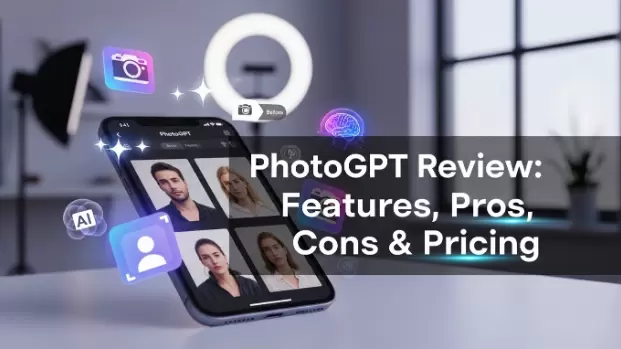
PhotoGPT turns your casual selfies into professional-looking photos without you needing to book an expensive photographer or even leave your house. Upload a number of pictures of yourself, from which the tool generates a personalized AI model of your face.
And within minutes, you can create top-quality images with zero camera, lighting, or a photographer needed.
Rather than an arranged shoot, days of rigging up gear, and Photoshop editing, you simply upload some selfies. You can get polished and competent photos or artistic portraits with hardly a fuss.
Whether you are a freelancer, an influencer, a small business owner or someone who just needs a good visual from home, PhotoGPT is a more convenient and affordable alternative to the conventional photography.
Key features
- Train a personal AI model from your photos — Train your personal AImodel from your own photos — Upload 3-5 selfies, and the system will match your face to generate realistic images, the more images the better, especially images at different angles and lighting.
- Presets for different looks & occasions — Just select the style of image that you want to create; headshots, street style, glam, travel, and more, so you do not have to worry with complicated prompts.
- Image edit & remix tools — PhotoGPT also offers image editing and remixing tools. In addition to generating new images, you can enhance existing photos or change backgrounds and scenes to refine your output.
- Credits-based generation & subscription plans — Usage is credit- or plan-based (generations consume credits); the pricing page lists tiered monthly/biannual billing options.
- Community samples & presets gallery — A public gallery and example presets make it easy to preview what types of images the platform tends to produce.
Pros
- Fast way to get polished headshots — If you need a batch of professional-looking portraits quickly (team photos, LinkedIn), PhotoGPT noticeably speeds that up compared to booking a shoot.
- Lots of usable presets = less fiddling — Templates remove the need for complex prompts; that’s a UX win for non-technical users who just want results.
- Flexible pricing and occasional lifetime/deal offers — They appear on the site and marketplaces (AppSumo has offered lifetime/deal options), which can make the tool cheap to test if you catch a promotion.
- Good for volume work (teams/brands) — Case studies and a guide show PhotoGPT used for generating team headshots and marketing assets quickly.
Cons
- Results vary — sometimes the AI misses likeness or details — Multiple reviewers report good outcomes often, but some images can miss the mark (look less like the subject or have small artifacts). You may need multiple passes.
- You’ll usually need several quality selfies to train the model — For consistent likeness, you must supply varied, well-lit reference photos; a couple of random selfies won’t cut it.
- Higher-res or advanced output may be gated to higher tiers — Lower-cost plans may limit credits or upscaling; power users may find the best results require moving up a plan.
- Privacy / usage clarity — read the fine print — Any tool that trains a personal model is worth checking for data retention, licensing of generated images, and whether models are stored or shared. PhotoGPT publishes docs and a contact page, but check terms before bulk training.
PhotoGPT Pricing (What You Pay — and What You Get)
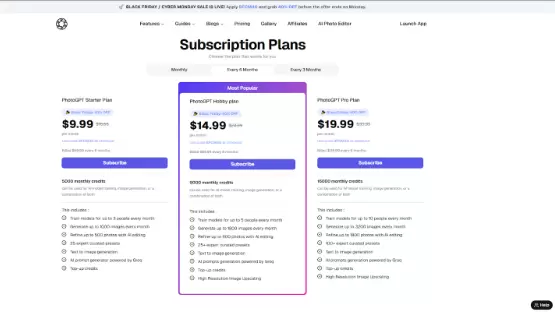
PhotoGPT uses a credit-based subscription model with monthly plans. All plans include 25-30+ curated preset themes, the AI photo editor, image upscaling, and the ability to train AI models on your face. Pricing is straightforward with no hidden fees.
PhotoGPT — Starter
- Shown price (promo): $9.99 / month (Black Friday price; original struck-through $16.66).
- Billing: You will be billed $59.99 every 6 months.
- Credits / limits: 5000 monthly credits (can be used for model training, generation or edits).
- Included: Train models for up to 3 people, create up to 1,000 images / month, fine-tune up to 500 photos with AI touch ups, 25 expert tip curated presets, text-to-image generation tooling and Groq-powered AI prompt generator are included in your subscription
PhotoGPT — Hobby (Most Popular)
- Shown price (promo): $14.99 / month (Black Friday pricing is shown; original was crossed out $24.99).
- Billing: Every 6 months, charged $89.99.
- Credits/limits: 9,000/monthly credits.
- Included: Train models with up to 10 people, generate up to 3,200 images / month, refine up to 1,800 photos, add 100+ expert presets Support: text-to-image and Groq AI prompts Support only for paid plans.
PhotoGPT — Pro
- Shown price (promo): $19.99 / month (Black Friday price shown; struck original $33.33).
- Billing: Billed $119.99 every 6 months.
- Credits / limits: 16,000 monthly credits.
- Included: Train models for up to 10 people, generate up to 3,200 images / month, refine up to 1,800 photos, 100+ expert presets, text-to-image, Groq AI prompts, top-up credits, high-resolution image upscaling.
Free trial: PhotoGPT offers 5 free credits to test the platform before you commit. Not a ton, but enough to see if the quality meets your needs.
Note: Prices can shift, so check PhotoGPT's live pricing page before making decisions
Alternatives to PhotoGPT You Should Consider
If PhotoGPT doesn’t meet your needs — or you want to explore other options — here are some alternatives worth checking out:
- Canva — An online design tool, with simple photo editing and graphic and template options. Best for basic edits, social media posts, or any design-heavy work, although it doesn't offer AI- generated portraits. Good for users who need visuals but don’t need custom AI headshots. If you're building complete social media campaigns or marketing materials, our guide to the best content creation software covers more comprehensive tools like Canva and others that help you create visual content at scale.
- Photopea — A free browser-based photo editor, similar to Photoshop. Good for manual editing and control over images (layers, filters, retouching) More suited for users with some knowledge of DIY editing or who prefer quick manual adjustments than process automation through AI.
- DALL·E / Stable Diffusion–based tools — To generate creative or artistic images from text prompts. Good for concept art or stylized art, not so much for a portrait of a real human being as if they are a real person.
- Manual photo editing apps (e.g. Photoshop, Lightroom) — If you want to spend time manually editing photos for a more acute and purposeful edit.
All have trade-offs: control, quality and convenience — so pick according to what is most important to you (speed, creative freedom or budget).
Is PhotoGPT Worth It — Final Verdict
Short answer: Yes — if you have a need for quick, low-cost headshots or lifestyle images and want them all to look like they used the same photographer. For social media managers, use PhotoGPT and Ocoya to schedule and publish your AI-generated headshots across platforms automatically. The PhotoGPT does its best work when you’re looking for batches of images to use on profiles, in social posts or for marketing assets without the cost/time of a studio. The presets and model-training flow make it easy to get good results quickly, and occasional deals reduce the upfront risk.
However, there are caveats: outputs are not perfect every time. Expect a learning curve to reference photos (better inputs → better outputs), and be prepared to iterate on prompts and presets. If you require pixel-perfect likeness, guaranteed identity accuracy, or very high-res commercial outputs, you may hit limits on lower tiers or need human retouching. Reviewers and marketplaces show a mix of strong praise and some disappointment — this is a common pattern for early-stage AI image tools.
Practical recommendation: If you want professional-looking portraits or a creative batch of lifestyle images, try PhotoGPT on a small plan or catch a deal (AppSumo/lifetime offers show up periodically). Use at least 8–15 varied, high-quality selfies when training your personal model and set expectations: you’ll likely get a handful of excellent images and a few that need retries.