 Table of Content
NoCode‑X is a no‑code / low‑code platform that empowers users — from non‑tech founders to small teams and freelancers — to build full‑stack web applications without writing code. You use a visual, drag‑and‑drop interface to craft UIs, set up data models, manage logic and workflows, integrate APIs — basically build everything from frontend to backend, all without touching code.
What really makes NoCode‑X stand out is how it focuses on reusability and maintainability. Create a piece of logic or component once and use it in all your apps, even if they come from different companies. There are so many things you can do on this, especially if there are multiple projects or ongoing updates — meaning you will not need to start from the beginning each time.
And yes — there’s some AI magic under the hood. NoCode‑X offers AI‑assisted development: you get help building apps faster, using prebuilt components plus optional AI support to streamline the creation process and accelerate development.
In this review, I walk you through what NoCode‑X brings to the table, what works (and what doesn’t), how much it costs, and whether it’s worth your time (or money).
Key Features
- Full-stack visual app builder — UI builder, data model, backend automation and deployment all in one workspace (no external infra required). For another comprehensive no-code web app solution, check our review of Momen, which also offers drag-and-drop app building with templates and real-time collaboration features.
- Security-first tooling — SSO, role-based access control (RBAC), automatic data classification and encryption built into the platform rather than as add-ons. NoCode-X advertises “security by design.”
- Core-based hosting model — Instead of per-user seats, NoCode-X sells resource “cores” (CPU minutes, storage, bandwidth, and developer seats bundled) so you scale predictably by app consumption. Docs explain cores include CPU minutes, storage and bandwidth quotas.
- AI integrations & credits — You can add AI functionality (LLM-assisted app building, runtime LLM calls, AI agents inside apps). AI usage runs on a credit model (pay-as-you-use), with documentation showing how credits map to token consumption.
- Built-in optimizations for production — CDN delivery of static assets, idle-app optimizations, and simple scaling so apps are meant to behave like production services rather than hobby projects.
- Extensible integrations & deployment — Connect to APIs, integrate authentication providers, and export production-ready apps; the platform emphasises maintainability and reusability.
Pros — What NoCode-X does well
- True full-stack no-code (less glue work) — You get front end, backend, auth, storage and hosting in the same environment. That avoids fragile “glue stacks” and shortens the path from idea → deployed app.
- Security baked in — For teams that care about compliance and access control, NoCode-X includes enterprise features like SSO, RBAC and data encryption without forcing you into an expensive enterprise tier. That’s rare for no-code tools.
- Predictable, usage-based scaling — The core model packages resources (CPU, storage, bandwidth, a developer seat) so you pay for app capacity rather than confusing metered line items; helpful for forecasting costs as use grows.
- AI-ready with flexible billing — If you plan to use AI inside your app, NoCode-X’s credit model and planned BYOK (bring-your-own-key) options give control over spend and model choice. That can materially lower costs for heavy LLM use.
- Competitive cost benchmarks — The vendor positions the platform as lower cost than many enterprise alternatives and provides example scenarios showing cores can be cheaper than comparable managed setups. For budget-sensitive teams, that’s compelling.
Cons — Where NoCode-X may disappoint
- Steeper learning curve than consumer no-code tools — Because NoCode-X targets full-stack and security, it’s more complex than drag-and-drop builders (Glide, etc.). Expect a ramp-up period for admins and builders. Community notes and reviews mention a learning curve for advanced features.
- Resource pricing nuances can confuse newcomers — The “cores + AI credits” model is transparent and scalable, but teams used to per-seat SaaS billing may need to run cost simulations (NoCode-X provides calculators) to forecast real monthly spend. Mis-estimating CPU or AI usage could raise bills.
- Not a simple ‘one-click’ solution for tiny one-page projects — If you only need a static landing page or a simple form, NoCode-X may be overkill — lighter tools are cheaper and faster for trivial tasks.
- Ecosystem and marketplace maturity — Compared to incumbents (Bubble, OutSystems for enterprise), NoCode-X’s third-party plugin/marketplace and community may be smaller; that matters if you rely on community templates or prebuilt connectors.
Pricing
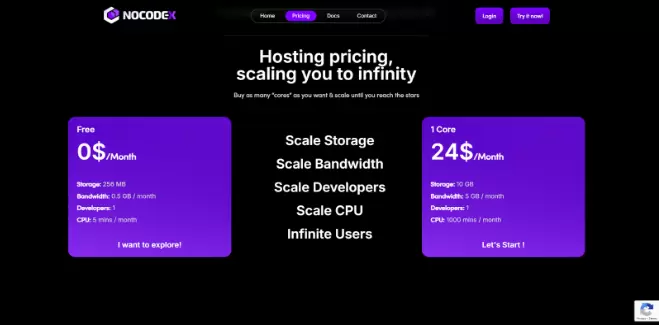
NoCode-X uses a core-based billing model plus pay-as-you-use AI credits:
- Cores: Each core bundles CPU minutes, storage and bandwidth plus one developer seat. Public docs and site pages show example pricing such as 1 core ≈ $24/month (1,000 CPU minutes, 10GB storage, 5GB bandwidth in the example) with the ability to add cores as you scale. This model is designed so you can scale linearly as traffic and features grow.
- AI credits: AI usage is charged separately on a credits model (examples and a credit calculator are in the docs). The docs show granular credit calculations for token use and note an added platform fee on managed credits, plus future BYOK options to reduce costs. If your app uses LLMs heavily (chatbots, generation, etc.), AI credits will be a meaningful part of your bill.
- Free tier: There’s a free/entry tier intended for exploration (very limited CPU/storage) so you can try building before committing. Paid plans then scale by adding cores.
Practical note: the core model is transparent and economical if you estimate needs correctly, but run the vendor’s cost examples against your expected traffic and AI usage to avoid surprises.
Alternatives — when to pick something else
- Bubble — Great for startups and makers who want a large community and many plugins; easier for solo builders but less focused on built-in enterprise security. (Use Bubble if you want rapid prototyping with tons of community resources.)
- Retool — Retool is better for internal tools and dashboards with a lot of data. It's made for ops teams that need database connectors and complicated UIs. Use Retool if you need to do database actions with low latency when making internal admin panels.
- OutSystems / Mendix — Enterprise low code platforms with a lot of governance, SLAs and enterprise integrations; usually more expensive but battle tested at scale. (Access by this when you require enterprise grade support, compliance and complex integrations.)
- Glide / Adalo — If your need is a simple mobile app or landing page with minimal backend logic, these lighter tools are faster and cheaper.
If you require full-stack + security + AI inside one platform, go with NoCode-X; choose the alternatives in case community plugins (Bubble) matter more to you, internal tool speed (Retool) is a bigger priority or enterprise change control (OutSystems).
Is NoCode-X Worth It?
Short answer: Yes — for teams that need secure, production-grade no-code apps with predictable scaling and built-in AI. NoCode-X’s biggest strengths are its full-stack approach and security features being available without forcing you to buy an expensive enterprise tier.
If you’re creating internal dashboards, client portals or MVPs that need to work like full-featured apps (with auth, RBAC and integration with other systems… and not be a total slug) then NoCode-X is a good option.
When to pause: If you only need a simple landing page, or you want a huge ecosystem of off-the-shelf plugins and templates, consider Bubble or a lighter tool first. Also, model the cost carefully if you plan heavy AI usage.
How to test it: Start with the free tier or a single core for a low-traffic sandbox. Build a single feature end-to-end (auth, DB, a small API) and run it for a month to validate performance and billing forecasts before migrating critical workloads.