
 Table of Content
Attio is a CRM platform that treats your business data like a flexible database instead of forcing you into rigid fields. You build it the way your business actually works. It's got custom objects, automatic data enrichment, and AI features baked in. Snap together your data structure however you need it.
For example, if you're running a B2B marketplace, you can create Buyers and Sellers as separate objects, track Transactions between them, then use AI to automatically research companies and qualify leads — all without leaving the platform.
In today's business environment, modern CRMs like Attio are part of a broader shift toward flexible SaaS tools that empower small businesses and teams. Where traditional CRMs force rigid structures, Attio—like many modern SaaS platforms—prioritizes configurability and real-time collaboration.
The interface looks like Notion had a baby with Airtable. Clean, fast, and way easier than traditional CRMs. Data syncs in real-time, and the enrichment happens automatically when you add contacts.
What You Get with Attio
Custom Objects (The Big Deal)
This is what sets Attio apart. Most CRMs force you into Leads, Contacts, Accounts, Deals. Attio lets you create whatever objects match your business. Need to track Investors and Portfolio Companies? Make those objects. Running a recruiting agency? Create Candidates separate from your regular contacts.
The platform starts you with five standard objects: Companies, People, Deals, Users (for product-led growth tracking), and Workspaces (for SaaS customer accounts). But then you can add custom objects for anything else you need.
Each object has 20+ attribute types — text, numbers, currencies, dates, relationships, formulas and calculated fields. You may create one to one, one to many, many-to-many relationships among objects. It’s sort of like building a custom database that just happens to look like a CRM.
The Pro plan lets you have 12 total objects. Enterprise is unlimited. For most teams, 12 is plenty.
Automatic Data Enrichment
This is one of those features you don't realize you need until you have it. Add a company domain or person's email, and Attio instantly fills in their logo, description, social profiles, employee count, annual revenue, funding raised, and connection strength based on your team's interactions.
It pulls from hundreds of data sources. The enrichment is particularly good for B2B - it knows funding rounds, ARR estimates, tech stack, and even connection strength (how many times your team has interacted with them).
Saves you hours of manually looking up companies on LinkedIn or Crunchbase. Just paste in an email address and boom, the record is populated.
Workflow Automation
Attio launched their visual workflow builder in late 2023. It's gotten pretty powerful. You can start your workflows from new records, changes in data, and list additions as well as call them via their web hooks or schedule. Actions include updating records, adding to lists, conditional logic with branches and loops, and AI operations.
The workflows aren't as complex as Salesforce's but way easier to build. Drag blocks, connect them, done. You can set rules to automate things like moving deals from stage to stage depending on replies, tagging companies that fit your ICP, or automatically create a task if certain conditions are met.
Each workflow run consumes credits. Most actions cost 1 credit. AI-intensive stuff costs more.
AI Research Agent
Launched in August 2024, this is genuinely useful AI. You configure questions like "Does this company have an office in Europe?" or "What's their current tech stack?" The agent searches the web, looks at your existing CRM data, finds answers, and stores them in custom attributes.
It's like having a junior researcher who qualifies every lead for you. Each research task costs 10 automation credits, but it beats manually googling 50 prospects a day.
Email Sequences
They added this in November 2024. Multistep email campaigns that actually integrate with the CRM instead of being bolted on like most tools.
You can trigger sequences based on deal stages, product usage events, or any CRM data change. The platform has AI email writing that uses prospect data, smart sending (respects time zones and business hours), automatic exits when prospects reply or book meetings, and out-of-office detection that pauses until they're back.
Dynamic senders let different team members send from the same sequence based on who owns the account.
Pros
- Highly configurable without code: Build the CRM that matches your GTM motion instead of contorting your process to fit the tool. This reduces admin overhead and makes reporting more meaningful.
- Good inbox & activity sync: Native Gmail (and Zapier-friendly hooks) reduces missed interactions and better relationship timelines.
- Nice balance of simplicity and power: It’s easy for non-technical users to get started with, but has enough power for more advanced use-cases (custom lists, pipelines, automation). Which is why reviewers repeatedly compare its ux to Notion, or Airtable but with crm bones.
- Active product improvements: Attio is iterating - features like increased workflow credits and expanded integrations show they’re investing in scale and automation capabilities. If you value a rapidly improving product, that’s a plus.
Cons
Not built for heavy outbound at scale: Several users note Attio isn’t a full outbound platform (no LinkedIn inbox integration, limited native cold outreach tooling); if your motion is large-scale cold sequences, Attio will need external tooling. Don’t expect it to replace a dedicated outbound stack.
Pricing and feature limits feel opaque at first: The mix of free seats, per-user pricing, and workflow-credit allocations means you should model costs for your expected automations — otherwise the bill can surprise you as automations grow. Recent credit bumps help, but you still need to plan usage.
Customization has a learning curve: The flexibility is powerful - and that power comes with choices. Plan on allowing some time for setup to properly model your data (fields, lists, and views) if you would like accurate reports and automations.
Gaps in niche integrations: The core (Gmail, Slack, Zapier) are great but sometimes niche or deeper bidirectional integrations (LinkedIn messaging, some call/playback tools) may be missing - you’ll need to count on zapier or custom API turned workflows for some workflows.
Pricing
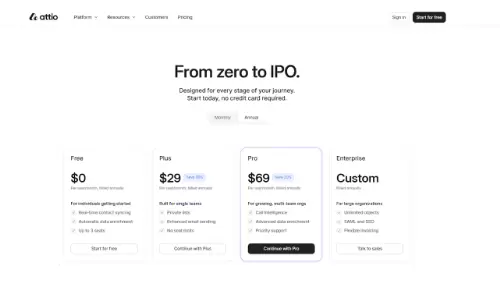
Attio use per-user tiered pricing (monthly or annual billing) with workspace-level resources (such as workflow credits):
- Free: $0 / user/month: Basic CRM tools, real-time contact data sync, auto enrichment, up to a certain small number of seats (ideal for solo users or as an evaluation).
- Plus: $29 per user/month (annual billing): Built for single teams — private lists, enhanced email sending, higher usage caps. (Monthly rates are higher; the site shows both monthly and annual figures.)
- Pro: $69 per user/month (annual billing): Adds advanced features (higher workflow credit allowance, priority support, advanced permissions and call intelligence in some listings).
Enterprise: Custom pricing: Higher limits, custom SLAs, and dedicated support. Talk to sales for exact terms.
Important note: Attio recently increased workflow credits per plan (Free → 250, Plus → 1,500, Pro - 10,000) - if you plan heavy automation, check the current credit table and extra-purchase options before you commit.
Alternatives
If Attio doesn’t match your motion, consider:
- Airtable: More general-purpose, wonderful for custom apps and internal tools; use Airtable if you value maximum schema flexibility and are comfortable wiring automations yourself.
- HubSpot CRM: Best if You want a full marketing + sales + service suite with strong native outreach, campaign management and analytics – out of the box.
- Pipedrive: Lightweight pipeline-focused CRM for straightforward sales teams who want simple deal management and native outreach features.
- Salesforce (or Zendesk Sell): For enterprise-grade needs and extensive ecosystem integrations (but expect higher implementation cost).
- Notion + integrations / Coda: If your priority is flexible docs and simple contact lists with heavy custom tooling rather than a purpose-built CRM.
(Why these? Attio’s sweet spot is flexible, modern CRM workflows - if you need deep marketing automation, a native outbound engine, or enterprise compliance, one of the above may be a better fit.)
Is Attio Worth It?
Attio is an excellent choice when you want a modern, flexible CRM that your team will actually use - especially if you prize a clean UX, custom views, and solid inbox/calendar sync. It’s ideal for startups and GTM teams that value configurability over a rigid, opinionated CRM.
But don’t kid yourself: if your business relies on heavy outbound sequences, LinkedIn inbox workflows, or you already run a best-in-class marketing stack that needs deep native integrations, Attio will fit part of the bill - not the whole stack. Model your automations and expected workflow-credit usage before you sign up.